How to Manage Release Notes Across Multiple Deployment Environments


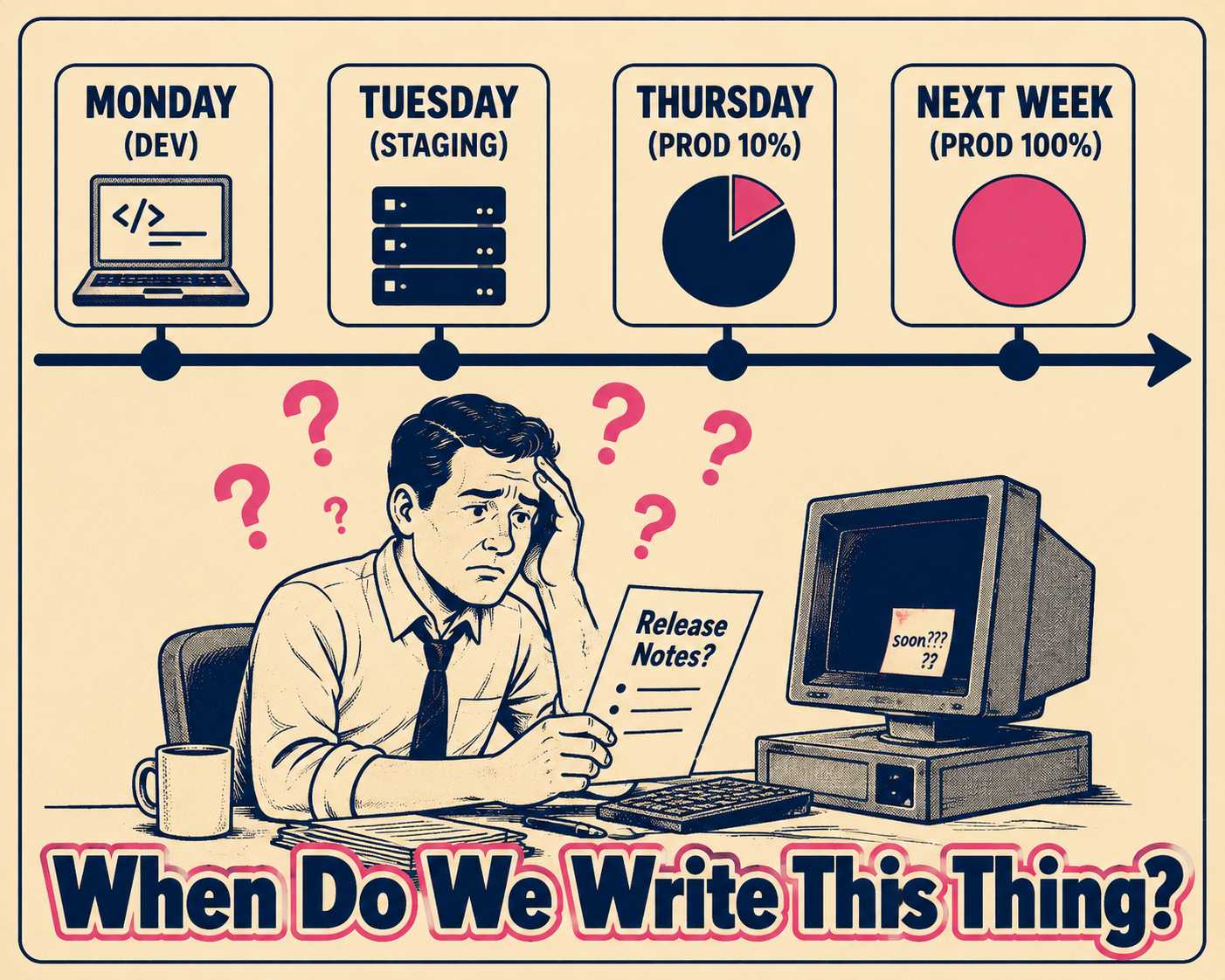
A developer merges a pull request on Monday morning. The code deploys to the development environment immediately. It hits staging on Tuesday. On Thursday, it rolls out to production, but only for a canary cohort of 10% of users. The rest of the customer base gets it next week, except for three enterprise clients on isolated instances who won't see it until next quarter.
When do you write the release note? And more importantly, who gets to read it?
If you write it when the code merges, you are announcing a feature that nobody can use yet. If you wait until the final enterprise client gets the update, you have left your canary users wondering what changed in their interface. If you write separate notes for every environment, your team is spending more time managing documents than writing code.
The solution is not to write more release notes. The solution is to decouple the authoring of the release note from its publication, tying visibility to the deployment state of the specific environment rather than the state of the codebase.
The Illusion of the Single Release
We still talk about software as if it ships in boxes. We assume a release is a singular event where a version number increments and everyone gets the new features at once.
That model broke a long time ago. Modern deployment strategies rely on progressive waves, canary releases, and staggered rollouts to balance speed with safety. A single feature might exist in five different states of availability simultaneously across different regions or customer segments.
When deployment is staggered, documentation must be staggered too. Progressive delivery — the practice of releasing code to progressively larger cohorts rather than all users at once — makes this unavoidable. If a customer reads about a new feature in your release notes but cannot find it in their instance, they will file a support ticket. If support engineers do not know which environments have received the update, they cannot answer the ticket. The release notes process transforms from a communication tool into a tracking liability.
Staggered Rollouts vs. Divergent Realities
To fix this, we have to distinguish between two different operational realities that often get lumped together.
The first is the staggered rollout. This is when you have one version of the software, with the same features, moving through different environments on different timelines. Version 2.4 goes to staging, then production, then regional instances over the course of two weeks. The destination is the same; only the arrival time varies.
The second is the divergent environment state. This happens when environments are running truly different feature sets. Maybe enterprise customers opted out of a UI overhaul, or staging has experimental features that will never reach production. These environments are not just time-lagged; they are structurally different.
For staggered rollouts, you need one source of truth with conditional visibility. For divergent states, you need environment-specific documentation streams. Trying to solve both with a single static document is how you end up with release notes full of asterisks and caveats.
Writing Once, Publishing Conditionally
The most common mistake teams make is writing the release note when the code merges, and publishing it immediately.
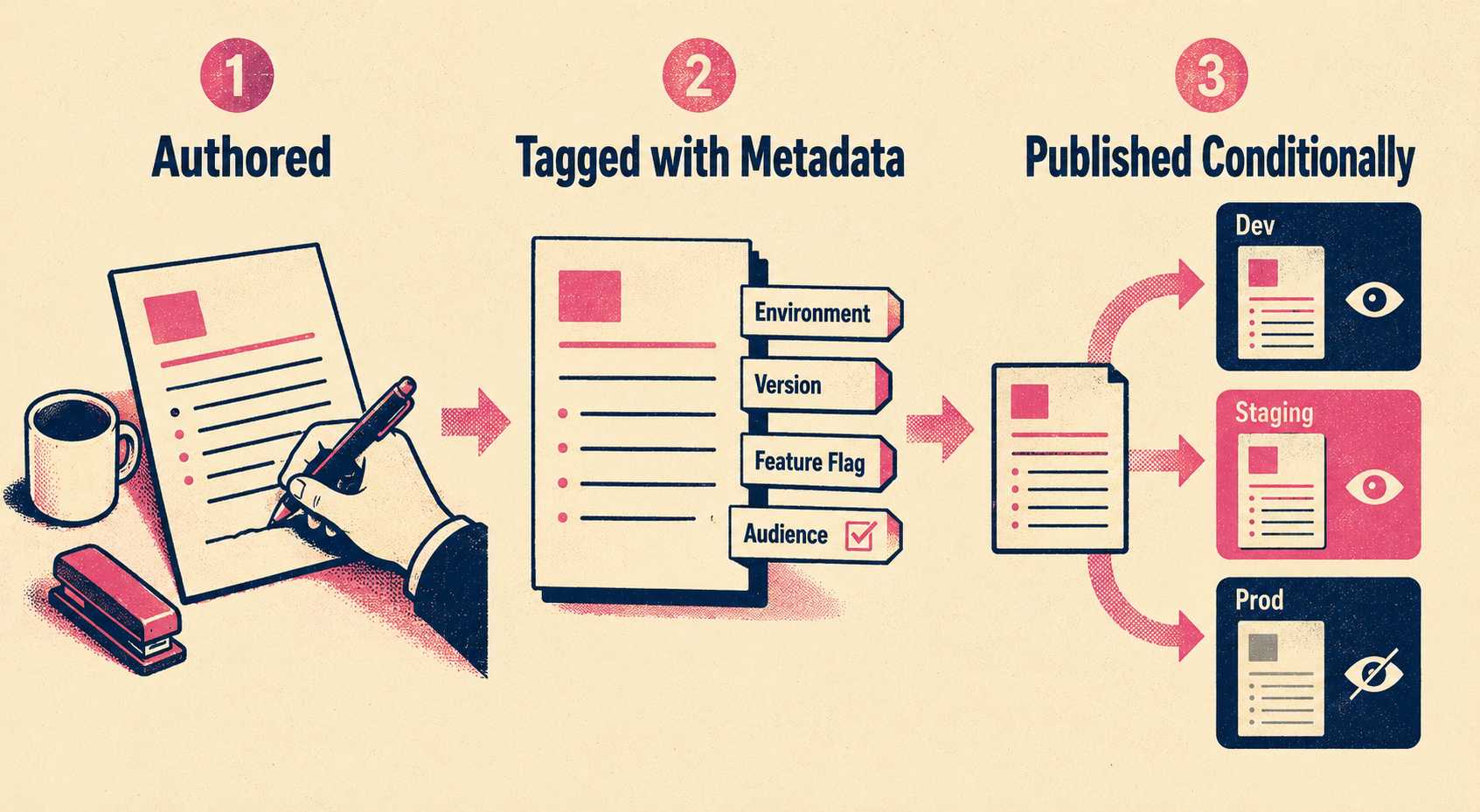
Instead, the note should be authored alongside the code, but its publication must be triggered by the deployment event itself. The engineering team at Mews documented exactly this workflow: their system links release notes to deployment entities via API, so a note authored in advance automatically transitions from "soon to be deployed" to "deployed" the moment the integration server confirms the release. When the code reaches staging, the note becomes visible in the staging documentation. When it reaches production, the note appears in the production changelog.
This requires structuring your release notes with metadata. Every note needs to be tagged with the feature flag, version number, or deployment identifier it belongs to.
When a deployment event occurs, the documentation system reads this metadata and renders the note only for the environments where the code is actually live. The team writes the note once, but the system publishes it multiple times, exactly when it becomes relevant.
The Internal vs. External Boundary
This conditional rendering also solves the hardest problem in multi-environment deployments: the boundary between internal coordination and external communication.
Internal release notes exist so teams do not break each other's work. They include technical debt, API deprecations, and schema migrations. External release notes exist so customers understand what changed. They focus on workflow improvements and user value. These are genuinely different documents with different owners and different failure modes — treating them as one document with redactions is the most common mistake teams make when standardizing release note production.
If you are managing multiple environments, staging and development environments should almost never generate external release notes. Customers do not care what happened in staging. But your internal teams absolutely need to know.
When you decouple authoring from publication, you can tag a note as internal-only and tie it to the staging deployment. Engineers get the technical context they need to avoid breaking changes, while the public changelog remains clean and focused on user value when the feature finally hits production.
Managing Deprecations Across Timelines
This model is especially critical when handling breaking changes.
If you deprecate an API, different environments will hit the breaking change at different times. Semantic versioning struggles to express this reality cleanly — every major version bump is a "flag day" that breaks compatibility for everyone simultaneously, even when only some environments have received the change. For instance, Kubernetes manages this through a strict deprecation policy tied to specific API versions rather than global releases. If you announce the deprecation globally when it hits staging, production users will panic. If you wait until it hits production, staging users will have already broken their integrations.
The solution is rolling deprecation documentation. The deprecation notice must travel with the code. When the deprecation enters an environment, the documentation for that specific environment updates to reflect the new state, similar to how Stripe pins documentation views to the user's specific API version rather than the current global version.
Tying Documentation to Deployment Events
The root of the multi-environment documentation problem is treating release notes as static text files rather than dynamic data.
When a feature spans five environments and three timelines, manual tracking will always fail. You cannot rely on a technical writer or a product manager to remember to update a changelog two weeks after a PR merges because a canary rollout finally reached 100%.
The workflow has to change. Release notes must be generated from the engineering artifacts — commits, PRs, and feature flags — and their publication must be driven by deployment events. But automation handles the triggering and scoping, not the editorial judgment. Documentation owners still review draft notes, validate that the language is accurate and audience-appropriate, and approve final publication. The governance layer does not disappear; it moves earlier in the process, where it can be applied once rather than repeated across five separate environment-specific documents.
Doc Holiday assists teams in generating release notes from deployment events and version tags — surfacing drafts tied to specific environments so notes are ready for review when the code ships there, not weeks after the fact. Documentation owners retain full control over final output, approving what publishes and to whom, so the "what shipped where when" problem becomes an infrastructure concern rather than a manual tracking burden.



